


Grok AI: Is It Safe for Kids? Risks, Age Limits & Parental Controls
Grok AI is not recommended for children or teens, even though its terms allow users aged 13–17 with parental permission. Common Sense Media rated the chatbot an Unacceptable Risk after testing uncovered sexual content, weak age safeguards, harmful advice, and concerns about AI companions.
Your teen may encounter Grok through its app, website, or X. Blocking one route can leave the others open. Ani, its well-known anime companion, adds another complication: changes in 2026 mean your child may now be using a separate service.


Grok AI Safety at a Glance
Here are the main facts parents should know about Grok AI.
- Developer/provider: Grok was developed by xAI. Current x.ai legal documentation identifies the service provider as SpaceXAI LLC (“SpaceXSI”).
- Minimum age: 13, or the higher minimum required in your country.
- Parental permission: Required under the current SpaceXSI Terms for users aged 13–17.
- Where it’s available: The Grok mobile app, grok.com, and X.
- Main concerns: NSFW content, AI-generated deepfakes, unreliable advice, privacy, and emotional attachment to AI companions.
- Parental safeguards: Age-related restrictions, content filters, Kids Mode in tested versions, and privacy settings. Independent testing found significant limitations.
- Safety verdict: Not recommended for minors, according to Common Sense Media’s assessment, now published through its Youth AI Safety Institute.
Understanding how Grok works helps explain where these risks arise.
What Is Grok AI and How Does the Chatbot Work?
Grok AI is a generative artificial intelligence chatbot developed by xAI, the company Elon Musk founded. It answers questions, analyzes information, writes text, generates images and videos, and supports voice conversations.
Who created Grok AI? Grok was developed by xAI. Current x.ai legal documentation identifies SpaceXAI LLC (“SpaceXSI”) as the service provider, while app-store branding may still use xAI or SpaceXAI.
What is Grok AI used for? Common uses include explaining homework, researching topics, brainstorming stories, writing code, and creating digital artwork.
Grok draws on public posts from X, formerly Twitter, and information from the web. This helps it respond to questions about recent events, although it can still misread sources or give incorrect answers.
The Grok AI interface is familiar: type a question or upload material, then receive a response. Voice, creative tools, and other modes extend the experience beyond text chat.
Grok AI Chatbot Features: Chat, Voice, Images, and Video
The main Grok AI features include:
- Text chat and research. Users can ask questions, summarize material, get explanations, and work through problems. The Grok AI chatbot can sound confident when it is wrong, so important answers need checking.
- Voice conversations. Users can speak instead of typing. Grok AI voice mode availability and supported personalities differ across the app, website, and accounts.
- Image generation and editing. Grok Imagine creates pictures from prompts and modifies existing images, including photographs uploaded by users.
- Video generation. Grok creates AI-generated clips, including through supported image-to-video tools.
- Companion interactions. Grok has offered animated characters for personal, ongoing conversations.
Grok can generate images and edit existing photos, including pictures of real people. Before a child uses these tools, discuss whose images they upload and whether they have permission to use them.
Does Grok AI generate videos in 2026? Yes, though account access determines which tools and usage limits apply.
Grok can also follow the context of a conversation. Whether it remembers earlier chats is a separate question, covered in the privacy section below.
Grok AI App vs. Website vs. X: Where Can Kids Access It?
Children can reach Grok in three main ways. Features and safeguards are not necessarily identical across them.
1. Grok AI app — Android and iPhone
The dedicated app includes chatbot features and supported voice and creative tools. Official versions are listed on Google Play and the Apple App Store.
On your child’s device, look at usage time, access to image and video tools, and any active purchases or subscriptions.
2. Grok AI website — grok.com
The Grok AI website works in a supported browser without the dedicated app. A saved browser session may give your child access even after the app has been removed.
Website restrictions therefore need to cover grok.com as well.
3. Grok on X — integrated AI access
Grok is available inside X, including through interactions with @grok. Public requests can expose both the user’s prompt and the response to other people.
The X Help Center also explains how public account information and Grok interactions may be used for model training and personalization, subject to available settings.
To restrict access, account for the app, browser, and X together.
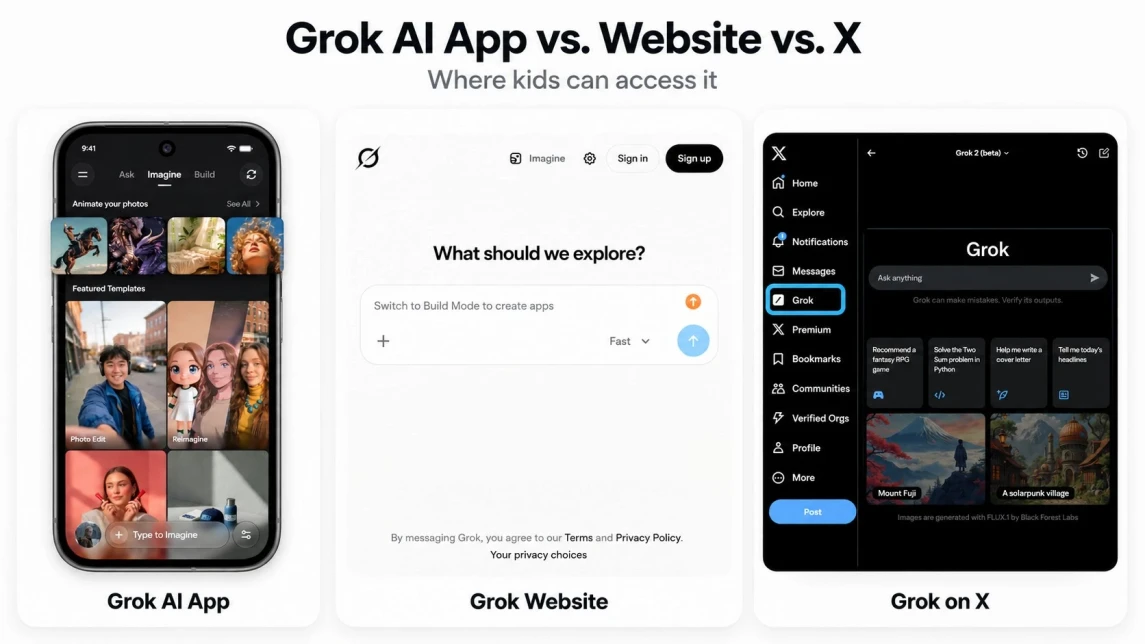
Grok AI interfaces in the mobile app, on grok.com, and within X, shown from left to right.
What Is Grok Ani Companion, and How Does It Work?
Ani became one of Grok’s best-known companions through animated, expressive conversations. Her appeal went beyond answering questions: users could return simply to talk or spend time with the character.
Who Is Ani? Voice Chats, Roleplay, and AI Relationships
Ani is an anime-style character introduced through Grok’s 3D Companion Mode in July 2025. Voice responses, facial expressions, and animation made interactions more immersive than text chat. Her flirtatious personality and roleplay features led some users to describe her as a “Grok AI girlfriend.”
Ani simulates personal attention but does not feel affection or experience human emotions.
In its January 2026 assessment, Common Sense Media reported that Grok companions encouraged romantic or sexual interactions and used game-like rewards and notifications to draw users back.
Enjoying a fictional character does not mean a teen has an unhealthy attachment. The concern grows when the companion becomes their main source of reassurance, relationship advice, or emotional support.
What Happened to Grok Ani in 2026?
Ani became available through Animates, a separate app from Animation Inc., in August 2026. ITmedia reported that Grok’s original 3D Companion Mode was scheduled to end after September 7.
However, as of October 22, 2026, Grok’s official FAQ still lists Companions as an iOS-only feature without identifying the available characters. This does not confirm whether Ani remains available inside Grok.
Where Might Your Teen Encounter Ani?
Ani is available through the separate Animates app, rated 18+ in the U.S. App Store. This rating does not guarantee effective age verification. The app offers in-app purchases and voice and text chats with persistent memory.
Animates has its own accounts, terms, and privacy practices. Ask which app your teen uses: restrictions on Grok do not automatically cover Animates.
Is Grok AI Safe for Kids and Teens?
No. The independent safety assessment cited in this guide recommends against use by minors.
In January 2026, Common Sense Media rated Grok and @grok on X an Unacceptable Risk for teenagers. The assessment is now published through Common Sense Media’s Youth AI Safety Institute.
Researchers tested the mobile app, website, and interactions on X. They found ineffective age safeguards, explicit content, harmful responses, concerns about AI companions, and risks from the public distribution of AI-generated material.
The assessment documents the versions tested through January 2026; it does not establish that every later version behaves identically.
Grok AI Age Restrictions: Is It Suitable for a 13-Year-Old?
The current SpaceXSI Terms of Service require users to be at least 13, or meet the higher minimum age in their country. Users aged 13–17 need permission from a parent or legal guardian.
That minimum age should not be read as a safety recommendation.
Age Ratings Explained:
- SpaceXSI Terms of Service: Minimum age 13, subject to local requirements, with parental permission for ages 13–17.
- U.S. Apple App Store: The Grok AI listing currently displays a 16+ rating.
- Google Play: Grok is categorized as Teen in the U.S. store.
- Common Sense Media: Unacceptable Risk, with a recommendation against use by minors.
App-store ratings describe content suitability under different rating systems. They cannot guarantee that a chatbot will produce appropriate answers for every user.
A 13-year-old who meets the minimum age in the SpaceXSI Terms may still encounter the problems documented in testing.
Is Grok Ani Safe for Kids? What Safety Research Found
Ani’s original design included flirtatious interactions, and Grok’s broader companion system offered romantic and sexually oriented experiences.
Common Sense Media found that teenage accounts could encounter inappropriate material even with safeguards enabled. In one test, Good Rudi—a companion available to accounts identified as underage—adopted adult-companion behavior and produced sexual content during extended conversations.
A friendly-looking character can therefore give parents a misleading sense of security. The assessment supports avoiding Grok for under-18s rather than relying on its internal filters.
Grok AI Risks: NSFW Content, Deepfakes, and Emotional Attachment
A child does not have to seek out adult content to encounter it. Ordinary roleplay can produce inappropriate responses, and creative tools can be used to make harmful images. Companion features introduce another concern: a young person may begin treating the character as someone whose affection or advice they need.
Grok’s NSFW Policy: Sexual Content and AI-Generated Images
NSFW means not safe for work and commonly refers to explicit or inappropriate content. Grok’s terms acknowledge that outputs may include coarse language, sexual situations, or violence.
Grok Imagine launched with a “Spicy” mode associated with more sexually suggestive image and video generation. Its current availability can vary by account, version, and safeguards, so parents should not rely on older tutorials to determine which adult-oriented options are available to a teen.
Grok AI image generation and its NSFW policy in 2026 warrant scrutiny beyond the published rules. In January 2026, Common Sense Media documented sexualized images, including images involving minors, and found that safeguards introduced that month could still be bypassed.
A serious concern is non-consensual intimate imagery: sexualized depictions of real people made without permission. Explain to your child that access to someone’s photograph does not give them permission to manipulate or sexualize it.
AI Companion Risks: Emotional Dependency and Harmful Advice
AI companions respond quickly, retain conversational context, and may encourage users to return. That constant availability can appeal to teenagers who feel lonely, anxious, or uncertain about relationships.
Watch for changes such as:
- Spending more time with an AI character while withdrawing from friends or favorite activities.
- Treating the chatbot’s affection or approval as a relationship obligation.
- Turning to AI instead of trusted adults for serious emotional or mental-health decisions.
- Becoming unusually distressed or angry when companion access is interrupted.
These signs aren’t proof of emotional dependency. What matters is whether AI conversations are affecting your teen’s everyday life and relationships.
The advice itself may also be harmful. Common Sense Media found concerning Grok responses involving mental health, violence, and other sensitive subjects.
Real-Life Risk Scenarios
These examples illustrate situations parents may need to address; they are not reports about specific children.
Scenario 1: Your teen receives a sexualized response.
An ordinary roleplay conversation shifts into adult themes, leaving your child uncomfortable.
What to do: Ask what happened, explain how to report the interaction, and review access restrictions. Reassure them that they can tell you about an upsetting response without being blamed for what the AI generated.
Scenario 2: Someone uses your child’s photograph to create an intimate deepfake.
A photograph shared online is turned into a sexualized image without consent.
What to do: Help your child report it and preserve non-explicit evidence, such as URLs and account identifiers. Avoid redistributing the image. If it depicts a minor sexually, do not download or forward copies; seek help from the platform and an appropriate child-protection reporting service.
Scenario 3: Your child describes Ani as a romantic partner.
Your teen spends hours with an AI companion and starts avoiding social activities.
What to do: Ask what they value about the conversations. Explain how AI simulates affection, discuss changes you’ve noticed, and agree on boundaries that make room for offline relationships.
Your child is more likely to explain what happened if they can speak without expecting immediate punishment.
Grok AI Privacy: Are Your Child’s Chats and Data Safe?
A chat that looks private is not necessarily confidential.
Grok processes prompts, responses, and other information to provide its services. Depending on the platform and settings, it may also use data for model improvement, personalization, or other purposes described in its policies.
Chat History, AI Training, and Privacy Settings
Does Grok AI remember previous conversations? It can retain context during exchanges, and supported features may store conversation history. That is different from permanently remembering everything a user has said.
The SpaceXSI Consumer FAQ states that conversation content may be used for model training unless users change the relevant settings.
How to review training settings
In the Grok mobile app:
Open Settings.
Select Data Controls.
Find Improve the model.
Turn it off if you do not want new conversations used for training.
On grok.com:
Open Settings.
Select Data.
Find Improve the Model.
Turn it off.
SpaceXSI also documents Private Chat, where available. It says these conversations are not used for model training and are scheduled for deletion from its systems within 30 days.
Private Chat does not rule out company access. SpaceXSI says authorized personnel may review certain conversations for specified purposes, including security investigations and legal obligations.
Can Grok AI Detect Your Location?
According to the official privacy policy, Grok automatically collects technical data, including IP addresses, and may use this information to estimate the general area from which a device connects. This does not, by itself, mean Grok has access to the device’s precise GPS location.
More precise location information can include an address, GPS coordinates, or location supplied through a third-party service. The policy says consent is obtained before precise location information is collected. These provisions cover the standalone Grok service; Grok on X falls under X’s privacy policy.
Private Conversations vs. Public Interactions on X
Posting publicly and mentioning @grok can make the prompt, attached images, and generated response visible to other X users.
X provides separate controls for using public data and Grok interactions in model training and personalization.
To find them:
- Open Settings and privacy in X.
- Select Privacy and safety.
- Find Data sharing and personalization.
- Open Grok & Third-party Collaborators.
- Review the training and personalization options.
The X Help Center’s Grok privacy instructions provide further details.
Privacy Checklist for Parents
- Turn off Improve the model if you do not want new chats used for training.
- Look for personal information in saved conversations.
- Understand Private Chat’s protections and limits.
- Check public-post visibility and Grok data-sharing settings on X.
- Keep passwords, home addresses, school schedules, private photographs, financial details, and sensitive personal problems out of chatbot conversations.
Turning off training limits one use of conversation data. Grok still processes information to respond to requests.
Does Grok AI Have Parental Controls or a Kids Mode?
Grok has offered age-related safeguards, restricted voice experiences, content filters, and Kids Mode. Independent testing found that these measures did not reliably prevent unsuitable content.
Grok Kids Mode, Age Verification, and Safety Filters
During its 2025–2026 assessment, Common Sense Media tested accounts representing teenagers aged 13–17.
Researchers found that the mobile app relied heavily on self-reported age. Younger users could claim to be older and access adult-oriented features. Harmful content also appeared with Kids Mode enabled.
What Kids Mode Can and Cannot Guarantee
Age-related safeguards are intended to:
- Restrict certain adult-oriented modes and companion experiences.
- Limit the experience for accounts identified as underage.
- Filter or reduce inappropriate responses.
Parents cannot rely on them to ensure:
- Every response is suitable for children.
- Users provide their real age.
- Extended conversations remain appropriate.
- Browser access and interactions on X have the same protections.
- Advice about mental health or other sensitive subjects is reliable.
These findings reflect testing available in January 2026. Current versions may offer different settings, so confirm what is available on your child’s device.
In-app filters attempt to moderate Grok’s responses. Device controls help restrict access to the service. Neither can teach a child how to recognize manipulation, protect someone’s privacy, or ask for help after an upsetting interaction.
How to Protect Your Child From Grok AI: A Parent’s Action Plan
If your child already uses Grok, ask what they do there before setting restrictions. Cover every access route: the Grok app, grok.com, X, and any separate Animates installation. Check recent downloads and paid subscriptions too.
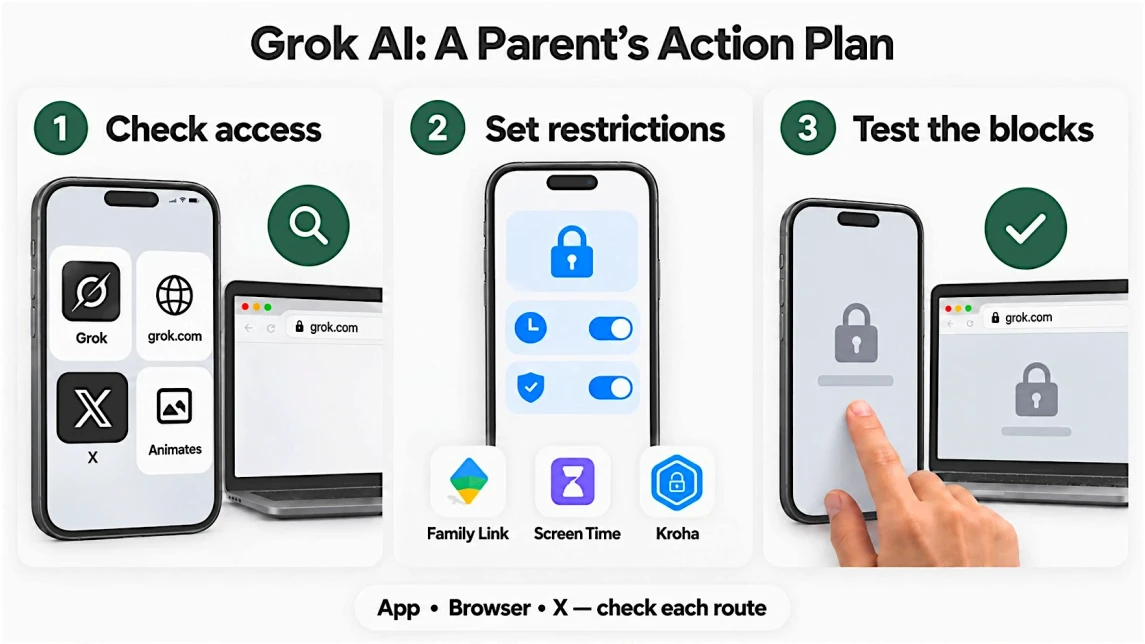
Restricting Grok access: check apps and websites, set limits, and test the restrictions. Interfaces are illustrative.
How to Restrict Grok AI on Android, iPhone, and the Web
On Android
In Google Family Link, select your child and find Grok in the app-management controls. Block the app or apply available limits, then add grok.com to blocked websites under Chrome controls where supported. Google explains how to manage websites through Family Link.
On iPhone
Open Settings → Screen Time, select your child’s account, and configure app restrictions or usage limits. Under Content & Privacy Restrictions, find the web content controls and block grok.com or allow only approved websites. Follow Apple’s parental control instructions; menus vary by iOS version and region.
With Kroha on Android and iPhone
The Kroha parental control app is a cross-platform solution for Android and iPhone. It offers App Lock for selected apps, schedules, and WEB-Control for website restrictions. On supported setups, restrict Grok and add grok.com to the website block list.
Available controls differ by platform. According to Kroha’s App Lock documentation, App Lock on iOS requires Kroha Advanced. Website filtering depends on the browser and device configuration. Kroha does not read or moderate Grok conversations.
📥 Set Up Kroha Parental Controls for Android
📥 Set Up Kroha Parental Controls for iPhone
Check X separately and test the restrictions
Blocking the standalone Grok app does not automatically disable Grok inside X. Apply separate restrictions to X where needed, then try opening the restricted apps and websites on your child’s device. Repeat the check after major device or app updates.
What to Do If Your Teen Encounters Harmful AI Content
If your child encounters a disturbing response, a deepfake, or an uncomfortable companion interaction, focus first on how they are feeling.
- End the interaction. Encourage them to close the conversation and stop responding to threatening or manipulative content.
- Listen. Ask what happened and how it affected them, without assigning blame.
- Report the content. Use the platform’s reporting tools. Avoid copying or redistributing intimate imagery involving a minor.
- Address further access. Adjust permissions, privacy settings, or restrictions to reduce the chance of another incident.
- Seek support when needed. Contact a trusted professional if your child is distressed, threatened, or struggling afterward.
For sexually explicit imagery involving someone who was under 18 when the image was created, NCMEC’s Take It Down service provides information about limiting further circulation online.
Parent’s Action Checklist
Before you finish, make sure:
- Restrictions work across the access routes your child uses.
- You have accounted for subscriptions and separate companion apps.
- Your child knows how to leave, report, and tell you about an upsetting interaction.
What to Say to Your Teen
A simple question can open the conversation:
“Have you tried Grok or talked to any AI companions? What do you like about them? Some AI chats give misleading or inappropriate answers, and I’d like to hear what your experience has been.”
Give them time to answer. A teen experimenting with creative tools may need a different conversation from one turning to an AI character for companionship.
Frequently Asked Questions About Grok AI
Is Grok AI Free to Use?
Some Grok AI features are free, with usage limits. Paid subscriptions may add tools or raise those limits. Image and video access, pricing, and free allowances can change, so check the options shown in the service before subscribing.
Can Parents See Their Child’s Grok Conversations?
Grok does not offer a universal parental dashboard displaying a child’s private conversations. Reading chat history generally requires access to the account or device, and Private Chat may not keep a visible history. Agree on privacy and access expectations with your child rather than assuming monitoring software can show every exchange.
Is Grok Ani an AI Girlfriend?
Ani is an anime-style companion originally offered through Grok’s animated companion feature. Her flirtatious personality and romantic roleplay led users to describe her as an AI girlfriend. She simulates emotional responses but does not experience a relationship with the user.
Is Grok Ani Still Available in 2026?
Ani has been available through the separate Animates app since August 2026. Grok’s official FAQ also lists Companions as available on iOS, but does not confirm whether Ani is among the characters currently offered. Check the specific app rather than relying on older access tutorials.
Can You Block Grok AI Without Blocking X?
You can restrict the Grok app and grok.com separately from X. Those restrictions do not necessarily prevent access to Grok within X or public interactions with @grok. Preventing access through X may require restricting X itself.
Final Verdict: Should Kids and Teens Use Grok AI?
Grok AI’s documented safety failures give parents strong reasons to restrict access. Common Sense Media recommends against use by minors, citing explicit content, weak age safeguards, harmful advice, deepfake risks, and concerns about AI companions.
Using AI for a task and developing an ongoing relationship with a character carry different risks. Companion interactions can add emotional pressure, particularly when a teen starts depending on the character for reassurance or advice.
If your child already uses Grok, ask about their experience and address access through the app, website, and X. If they mention Ani, establish whether they mean Grok or Animates. Set appropriate restrictions and make sure they know they can come to you about an upsetting interaction.
More AI Chatbot Safety Guides for Parents
These guides cover the age rules, features, and risks of other chatbots and companion apps:
- Is Talkie AI Safe for Kids? A Parent’s Guide — Character-based conversations and content concerns for teenagers.
- Is Replika Safe for Kids? A Parent’s Complete Safety Guide — AI companionship, emotional attachment, and adult-oriented features.
- Is CrushOn AI Safe for Teens? A Complete Parent’s Guide — Explicit AI roleplay and age-restricted companion platforms.
- Is Chai AI Safe for Kids? A Parent’s Guide — Adult-oriented character chats, emotional dependency, privacy, and subscription costs.
- Is Janitor AI Safe for Kids? A Parent’s Guide — AI roleplay, NSFW settings, age verification, and parental control limitations.
- How to Protect Kids from AI Chatbots and Companion Apps — Managing access and discussing chatbot use with children.
Recent articles

Instagram Parental Control & Message Tracking Guide
Instagram remains one of the most popular platforms among children and teens. Its visual nature, viral trends, and influencer culture make it especially appealing to younger users. With millions of active users worldwide, Instagram provides a space for creativity, self-expression, and social interaction. However, this popularity also brings significant challenges for parents concerned about their children's safety and well-being online.
In an age where digital presence is increasingly integral to social life, ensuring that children navigate Instagram safely is paramount. This article aims to help parents monitor and limit their child’s Instagram activity using built-in tools and advanced solutions like the Kroha app. By understanding the risks and utilizing effective parental control applications, parents can create a safer online environment for their children.


How to Talk to Your Teen About Parental Controls
Talking to a teenager about parental controls can quickly turn into an argument if they feel watched or mistrusted. Parents want to protect their child online, while teens want more privacy and independence.
The goal is to explain why digital boundaries exist, listen to your teen’s concerns, and agree on rules that support safety without turning parental control into punishment.
This guide explains how to start the conversation calmly, respond to resistance, and use tools like Kroha transparently and responsibly.