


Is Linky AI Safe for Kids? Linky App Review for Parents
For a child or teen under 18, Linky AI is a poor fit. Linky's newer Privacy Policy says the service is not directed to minors under 18, while Apple rates the app 18+. Google Play content ratings can vary by region: Linky AI may appear as 17+ or 18+ depending on the regional storefront. More importantly, Linky is no longer just a private AI-character chatbot: its own terms describe social features that can connect users with other people.
That changes what you need to look at. Mature AI roleplay is one concern, but so are real-user messaging, social matching, location-based discoverability, personal data, emotionally immersive AI companions, and spending on coins, cards, and subscriptions.


Linky AI Safety: What Parents Should Know First
For kids and teens under 18, Linky AI is a poor fit. It combines AI character chats with social features such as user matching, messaging, location-based discovery, mature content, and in-app purchases. The app does have moderation and safety tools, but that does not make it a service designed for children.
Linky’s own age rules are also somewhat inconsistent. Its newer Privacy Policy says the service is not directed to anyone under 18 and tells parents to make sure minors do not create or use an account. Its newer Terms of Service use different age thresholds for Android and iOS, which makes the picture less clear than a single app-store rating might suggest.
For parents, the simplest approach is to treat Linky as an adult-oriented social AI app. If your child is under 18, blocking or restricting the app at the device level makes more sense than relying on Linky’s own settings.
What Is Linky AI App and How Does It Work?
Linky AI sits somewhere between an AI character platform and a social network. You can chat with ready-made AI personalities, create characters of your own, use text and voice features, roleplay, collect character cards, and share creations with the wider community. Google Play currently lists the Android version at 10M+ downloads.
That hybrid design matters. A parent who assumes every conversation in Linky is simply a child talking to a bot may miss the app's human-to-human social features.
What Is Linky AI Chat?
The core Linky AI chat experience revolves around characters with their own personalities, backstories, voices, and visual styles. Conversations can be casual, fictional, romantic, or companion-like. Linky also promotes its characters as available around the clock and says conversations become increasingly personalized as the system learns a user's preferences.
That makes the experience quite different from asking a general-purpose assistant for homework help. A character can become an ongoing presence rather than a tool you open for one question and close again.

Linky AI lets users chat, roleplay, and interact with AI-generated characters designed for ongoing companion-style conversations.
AI Characters vs Real Users: Linky's Social Features Explained
This is the part many Linky AI reviews underplay.
Linky's Terms of Service describe it as an “AI-powered social platform” where users can interact with AI characters and connect with other users, including through in-app messaging. Its Privacy Policy goes further: Linky can recommend users to one another, make profiles discoverable, and use social matching. A nearby users feature can use city-level location when permission is granted.
The privacy policy also describes text and voice messaging as well as audio and video chat functions. So if Linky appears on your child's phone, one of the first questions should be whether they have only been talking to AI characters or have also used the social side of the platform.
Linky AI App Features, Platforms, Languages, and Pricing
Linky AI is available on Android and iPhone. The app can be downloaded without an upfront purchase, but Google Play lists ads and in-app purchases, while Apple's listing describes it as free with in-app purchases.
Its main features include:
- AI character text and voice conversations
- character creation and community sharing
- social features and interactions with other users
- collectible character cards
- virtual coins and paid purchases
- Pro and Gold subscription options
Apple's App Store listing currently shows 10 supported interface languages: English, Arabic, French, German, Indonesian, Italian, Japanese, Portuguese, Simplified Chinese, and Spanish. Google Play does not provide an equivalent full list of Android interface languages; instead, Linky says its AI conversations support English, German, Indonesian, and more than ten additional languages.
Apple also labels the app as containing loot boxes. That is worth distinguishing from an ordinary subscription because Linky's monetization includes virtual currency and card-based mechanics as well as recurring plans.
Linky AI Age Rating: Why You May See 17+ or 18+
The apparently conflicting numbers come from different sources, and they do not all mean the same thing.
- Google Play: Linky's content rating may vary by country or region, with 17+ or 18+ appearing depending on the storefront. Google Play uses locally relevant content ratings, so the same app may not carry the same age label everywhere.
- Apple App Store: currently rates Linky AI 18+ and lists mature or suggestive themes, sexual content or nudity, messaging and chat, user-generated content, loot boxes, and age assurance among its disclosures.
- Linky Privacy Policy: says the service is not directed to minors under 18 and states that parents and legal guardians are responsible for ensuring that their children do not attempt to create or use an account.
- Linky Terms of Service: the newer Terms, updated in July 2025, use platform-specific thresholds: under 16 on Android and under 18 on iOS. Users below the applicable threshold may not access the service without parental or legal-guardian consent, and Linky reserves the right to verify age.
Linky's official age guidance is not fully consistent across its published policies. For parents, the clearest benchmark is 18+: Apple currently rates the app 18+, and Linky's newer Privacy Policy says the service is not directed to minors under 18.
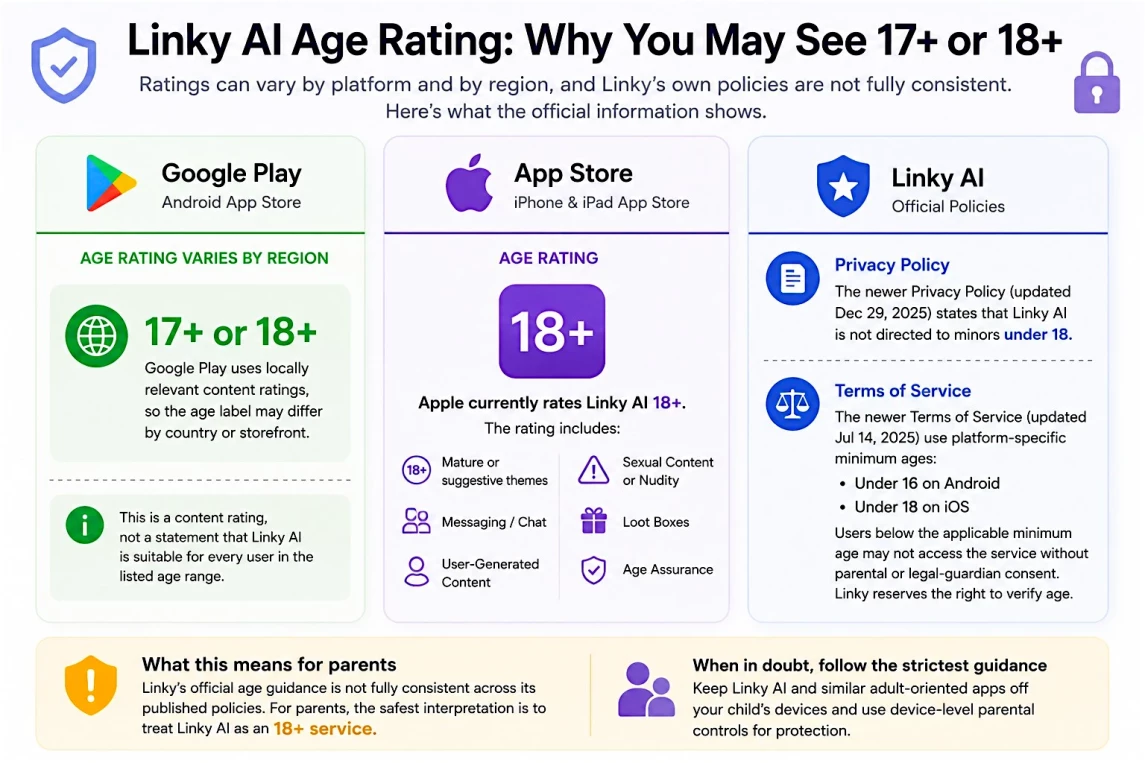
Linky AI age guidance varies across app stores and its own published policies. For parents, 18+ is the clearest benchmark.
Linky AI NSFW and Content Risks Parents Should Know
Older Linky reviews often describe the app through an NSFW toggle. That is not the most reliable way to assess the product in 2026 because interfaces and moderation rules change.
Better evidence comes from current store disclosures and documented third-party observations. Apple's current listing still flags mature or suggestive themes and sexual content or nudity. Australia's eSafety Commissioner documented Linky search categories including romance and spicy and reported sexually explicit material in character descriptions when its guide was updated in May 2025.
At the same time, Linky's Terms prohibit pornographic, obscene, violent, abusive, and other objectionable user content and reserve the right to screen or remove it. A moderation policy therefore exists. What it cannot do is guarantee that every AI-generated or user-created interaction will be suitable for a minor.
Is Linky AI NSFW? What the Current Filters and Content Ratings Show
The useful answer is more nuanced than yes or no.
Linky has had adult-oriented and sexualized material documented by independent safety reviewers, and Apple's current 18+ disclosures still identify mature and sexual content categories. Yet Linky's own rules also prohibit several forms of explicit user content.
For you as a parent, that means old screenshots of a particular NSFW switch matter less than the broader picture: the platform has an adult-oriented content context, user-created characters, generative conversations, and an 18+ designation on Apple.
Can Linky AI Give Harmful, Inaccurate, or Manipulative Responses?
AI characters generate replies rather than retrieving a guaranteed, reviewed answer from a fixed database. Australia's eSafety Commissioner specifically warns that AI chatbots such as Linky may produce inaccurate or harmful responses.
The conversational style can make those responses feel more authoritative than they deserve. An affectionate or reassuring character is still software, not a therapist, teacher, or trusted adult who understands your child's circumstances.
That distinction becomes particularly important when the subject moves from fictional roleplay into relationships, mental health, self-worth, or real-life decisions.
Is Linky AI Safe to Use? Privacy, Social Contact, Emotional Attachment, and Spending
Explicit content is only one layer of the risk picture. Linky's current product combines AI companionship, real-user social features, personalized profiles, location-based matching, advertising-related data processing, and several forms of paid engagement.
Each deserves separate attention.
Privacy and Social Matching: What Linky Collects and Who Can See You
Linky's Privacy Policy is unusually useful here because it spells out how the social side works.
Profile creation includes nickname, age, and gender, while optional fields can include occupation, hobbies, personality, status, language style, height, weight, and profile photographs. Some optional information may be shown to other users. For social matching, Linky says it may process OpenID, location, IP address, and gender and may recommend users to one another unless discoverability is disabled.
The nearby users feature can use coarse, city-level location. The app can also process text and voice chat data and, when those functions are used, audio/video chat records or video content. Linky says chat data is encrypted and processed for security screening and service quality.
There is another detail worth knowing: Linky's Privacy Policy says Linky and Linky Real form a unified platform. Account information, profiles, user content including chat messages, usage data, and settings can be synchronized between them. Separately, Linky says behavioral and profiling data may be shared with online advertising service providers. Those are two different data flows and should not be confused.
The app-store promise of private, encrypted conversations therefore should not be read as meaning that chat-related data is never processed or moved within Linky's own platform ecosystem.
Emotional Attachment and Mental-Health Advice from AI Companions
Linky itself markets its characters as 24/7 companions and promotes empathetic conversations as a way to ease stress or help when a user feels anxious or overwhelmed. That positioning is precisely why the emotional side deserves scrutiny.
AI companionship is no longer a niche behavior among teenagers. A 2025 Common Sense Media survey found that 72% of U.S. teens had used AI companions at least once, 52% used them regularly, and one-third of teen users had chosen an AI companion instead of a person for an important or serious conversation.
None of that proves that using an AI companion automatically leads to dependency. Look instead for changes in function: late-night conversations, distress when access stops, pulling away from friends or family, or turning to an AI character as the primary source of comfort and advice.
Coins, Character Cards, Loot Boxes, and Subscription Costs
Linky's business model goes beyond a simple paid upgrade. Its Terms of Service describe free access alongside subscriptions, daily coins, additional card draws, virtual currency, and renewable paid plans. Apple's current listing separately labels the app as containing loot boxes and lists coin packages, Linky Pro, and Linky Gold among its in-app purchases.
For a child's device, check three things: whether purchases require approval, whether a recurring Linky subscription is active, and whether virtual-currency spending has already occurred. Prices vary by country, so the purchase history on the actual device is more useful than a price quoted in an article.
Does the Linky AI App Have Parental Controls?
Linky has moderation rules and age-related controls, and Apple's listing identifies age assurance as an in-app control. Its Privacy Policy also says Linky collects age or date of birth and may use stronger age-authentication tools where local law requires them.
That is not the same as a parent-linked dashboard.
The public Linky documentation reviewed for this article does not describe a system where you can use your own phone to block Linky for your child, impose a parent-controlled schedule, or approve newly installed apps. For an under-18 user, the practical question is therefore not how to configure Linky into a child mode; it is how to control access at the device level.
Kroha is one example of that approach. Its App Blocker lets parents manage installed apps, block selected apps or categories, and apply schedules or daily usage limits. Kroha also provides notifications about new app installations. On a child's iPhone, Kroha states that its App Lock functionality requires Kroha Advanced.
For Linky itself, blocking access makes more sense for a child than scheduling “safe hours” for an adult-oriented service. Scheduling remains useful for age-appropriate apps that your child is allowed to use.
What Device-Level Parental Control Adds
Linky's own safety settings do not give you parent-level control over the app from your device. A device-level parental control app such as Kroha adds a separate layer of protection that works outside Linky itself.
With Kroha, you can:
- Block or restrict access to Linky AI and other age-inappropriate AI companion apps, depending on the child's device, operating system, and parental control setup
- Set schedules and time limits for age-appropriate apps your child is allowed to use
- See installed apps and identify newly added apps if your child switches to another AI companion
- Manage app access without reading your child's private conversations
This approach is useful beyond Linky. If your child moves to another AI chatbot or companion app, the same device-level rules can still apply instead of relying on the settings of each individual platform.
📥 Block AI Companion Apps on Android with Kroha
📥 Set Up Parental Controls on iPhone with Kroha
What to Do If You Find Linky AI on Your Child's Phone
Finding Linky on the phone tells you very little about how it has actually been used. Start there.
- Ask what your child uses Linky for. Find out whether the attraction was character roleplay, companionship, creative storytelling, or the social side of the app.
- Separate AI chats from real-user contact. Ask whether they used social matching, direct messaging, nearby users, voice/video features, or Linky Real. Those interactions raise different privacy questions from an AI character chat.
- Check profile and location exposure. Review discoverability and location permissions, especially if your child added photographs or optional profile information.
- Review purchases. Check the relevant App Store or Google Play account for subscriptions, coin purchases, or other recurring charges.
- Explain the age issue plainly. Linky's documents are not perfectly aligned, but its newer Privacy Policy states that the service is not directed to anyone under 18.
- Remove, block, or restrict access if your child is under 18. Device-level app controls are harder to bypass by simply changing an in-app setting.
- Deal with the account, not just the icon. Linky's Privacy Policy says profile information and individual messages can be deleted and that account deletion is available through Settings. It also says an account-deletion request generally applies across the unified platform, subject to technical or operational limitations.
AI Companion and Social App Safety Resources for Parents
AI companion services differ sharply in age rules, social features, and content policies. These related guides can help you compare platforms instead of treating every character chatbot as the same product.
- Chai AI — Parent’s Guide
- Janitor AI — Parent’s Guide
- Talkie AI — Parent’s Guide
- CrushOn AI — Parent’s Guide
- Character AI — Parent’s Guide
Exploring these guides will help you understand how different AI companion platforms compare and what safety expectations make sense for your child’s age and digital habits.
FAQ: Linky AI Safety for Kids and Teens
What is the Linky AI age rating?
Linky AI's age rating can vary by platform and region. Apple currently rates the app 18+, while Google Play may display 17+ or 18+ depending on the storefront. Linky's newer Privacy Policy says the service is not directed to minors under 18, so 18+ is the clearest benchmark for parents.
Is Linky AI NSFW?
Linky has been associated with mature and sexualized content, and Apple's current 18+ listing flags mature or suggestive themes and sexual content or nudity. Australia's eSafety Commissioner also documented romance and spicy search categories and explicit character descriptions in 2025. Linky's own rules prohibit pornographic and other objectionable user content, so the platform does have moderation policies; that does not make it child-oriented.
Can Linky AI users talk to real people?
Yes. Linky's newer Terms describe social features that connect users with one another, including in-app messaging. Its Privacy Policy also describes user recommendations, social matching, discoverability, nearby users, and text, voice, audio, and video communication features.
Does Linky AI collect location or chat data?
Linky's Privacy Policy says social matching can involve location and IP data, while nearby users can use coarse city-level location with permission. It also describes processing text, voice, audio, and video chat data depending on the functions used.
Can parental controls make Linky AI safe for a child?
No. Parental controls cannot turn an adult-oriented service into a child-oriented one. They can help parents manage access at the device level, but for children and teens under 18, the safer approach is to treat Linky as off-limits rather than trying to make it safe through filters.
How can parents block or restrict Linky AI?
Parents can use device-level parental controls to block or restrict Linky AI, manage app installs, and set rules for age-appropriate apps. A parental control app such as Kroha can help parents manage app access outside Linky itself, although available controls may vary by device, operating system, permissions, and setup.
How can a Linky account and its data be deleted?
Linky's Privacy Policy says users can delete profile information, remove chat messages from the message list, and delete the account through Settings. Account deletion generally removes the relevant data across the unified Linky platform, although Linky notes that technical, operational, and legal retention limitations can apply.
Final Verdict: Is Linky AI Safe for Kids?
For children and teens under 18, Linky AI should be treated as off-limits. The clearest benchmark for parents is 18+, especially because Apple's listing rates the app 18+ and Linky's newer Privacy Policy says the service is not directed to minors under 18.
- Under 13: Linky AI is not appropriate. Its social features, mature content context, AI companionship, and monetization are designed around an older audience.
- Ages 13–17: Linky's newer Privacy Policy places these users below its stated audience. Although its Terms use different Android and iOS eligibility thresholds and Google Play ratings can vary by region, 18+ remains the clearest benchmark for parents. Treat the service as off-limits rather than trying to make it safe through filters alone.
- 18+: the age issue changes, but privacy, social matching, location exposure, emotional reliance, and in-app spending still deserve attention.
Linky is not just another AI chatbot. It combines AI companionship with social-network mechanics, which means parents need to think beyond content filters alone. If your child is under 18, clear family rules and device-level app controls are a more coherent response than relying on Linky's internal moderation. The aim is not to read every conversation, but to keep adult-oriented platforms outside the boundaries set for a child's device while leaving room for age-appropriate technology.
Recent articles

Instagram Parental Control & Message Tracking Guide
Instagram remains one of the most popular platforms among children and teens. Its visual nature, viral trends, and influencer culture make it especially appealing to younger users. With millions of active users worldwide, Instagram provides a space for creativity, self-expression, and social interaction. However, this popularity also brings significant challenges for parents concerned about their children's safety and well-being online.
In an age where digital presence is increasingly integral to social life, ensuring that children navigate Instagram safely is paramount. This article aims to help parents monitor and limit their child’s Instagram activity using built-in tools and advanced solutions like the Kroha app. By understanding the risks and utilizing effective parental control applications, parents can create a safer online environment for their children.


How to Talk to Your Teen About Parental Controls
Talking to a teenager about parental controls can quickly turn into an argument if they feel watched or mistrusted. Parents want to protect their child online, while teens want more privacy and independence.
The goal is to explain why digital boundaries exist, listen to your teen’s concerns, and agree on rules that support safety without turning parental control into punishment.
This guide explains how to start the conversation calmly, respond to resistance, and use tools like Kroha transparently and responsibly.