


How to Prevent Kids from Bypassing Parental Controls Using VPNs, Proxies, Additional Accounts, or Other People's Devices
Many children eventually find ways to bypass parental controls—installing a VPN, using proxy sites, creating extra accounts, or borrowing someone else’s phone. While this can be frustrating, it often reflects curiosity, growing independence, or simple peer influence rather than an attempt to break rules.
Fortunately, most of these workarounds can be prevented. With secure device settings, reliable parental control tools, and open conversations about online safety, you can make bypassing restrictions far more difficult while still maintaining trust.
This guide outlines the most common bypass methods, how to prevent them, and how to build healthier digital habits without constant conflict.


How to Stop Kids from Bypassing Parental Controls
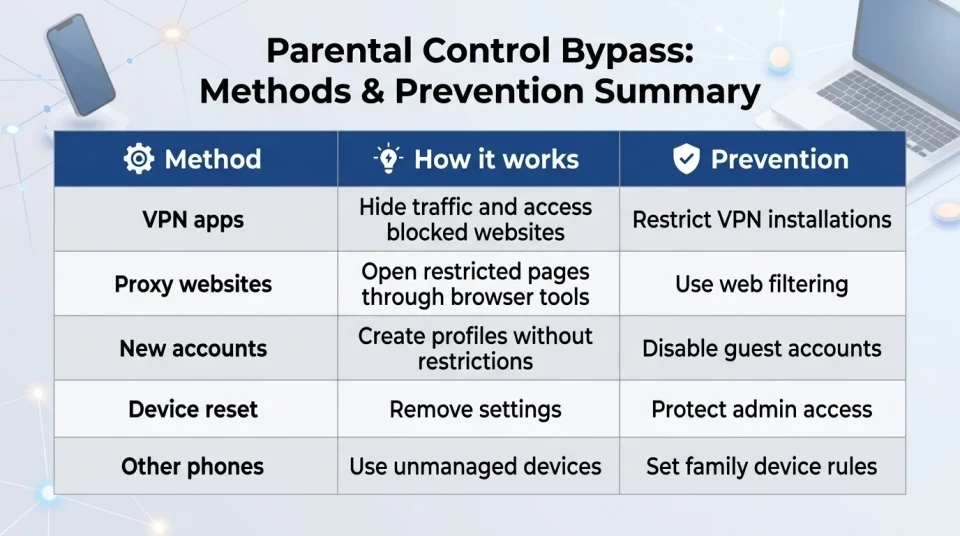
Children can bypass parental controls in several ways, including installing VPN apps, using proxy websites, creating additional device accounts, borrowing another phone, or resetting device settings. While no solution can eliminate every workaround, combining technical protection with clear family expectations significantly reduces the risk.
To make parental controls more effective:
- Block or restrict VPN and proxy applications whenever possible.
- Protect parental settings with a strong password or PIN.
- Prevent unauthorized account creation on the device.
- Review newly installed apps regularly.
- Use content filtering instead of relying only on app time limits.
- Talk openly with your child about why these restrictions exist.
The most effective approach combines reliable parental control software with trust, consistent family rules, and regular conversations about responsible technology use.
Why kids bypass controls
Most children don't bypass parental controls simply to break rules. Often, they are looking for more privacy, independence, or access to apps and content their friends use. In many cases, this behavior is part of testing boundaries rather than an attempt to hide something inappropriate. Some reasons include:
- Need for autonomy: A child might hide phone use to maintain personal space.
- Peer influence: Using apps popular among friends may tempt them to circumvent limits.
- Frustration with boundaries: Controls may feel restrictive, pushing kids toward finding loopholes.
- Lack of digital literacy: They simply don’t understand why limits exist and act out.
Recognizing these motives can help you approach tech rules with empathy and effectiveness.
Setting rules to support healthy device habits
Clear family rules on device use reduce triggers that lead kids to bypass controls. Consider these practical guidelines:
- Device-free family meals: Create a no-phone zone during shared time to build connection.
- Device routines before school and bedtime: Limit screen time to help regulate daily habits and sleep.
- Screen-free zones: Designate certain spaces, like bedrooms or study areas, as device-free to encourage focus.
- Weekend and holiday rules: Balance leisure screen time with outdoor and creative activities.
These routines support a balance of freedom and protection while encouraging responsibility.
Best Tools to Prevent Kids from Bypassing Parental Controls
Built-in parental controls are useful for basic limits, but older children often learn how to work around them by installing VPNs, using web proxies, switching accounts, or borrowing another device. Upgrading to robust apps helps you maintain settings across scenarios.
Basic built-in options
Android Digital Wellbeing and Apple's Screen Time provide useful built-in tools for managing screen time, blocking content, and limiting app usage. However, older children may still find ways around these controls by installing VPNs, switching accounts, or resetting device settings if additional protections aren't enabled.
Kroha parental control
For families who need stronger protection, Kroha combines screen time management, app blocking, content filtering, and tamper protection in a single dashboard. Parents can monitor device activity, manage app access, apply content restrictions, and protect settings from unauthorized changes that could weaken parental controls.
Other popular apps
Tools like Bark parental control or Net Nanny offer similar protections but often vary in ease of use or supported platforms. Choosing one depends on your device environment and desired controls.
Practical steps to boost control security
Strengthening settings helps keep restrictions effective over time. Key actions include:
- Protect settings: Set strong passwords and enable settings locks to prevent tampering.
- Control app installations: Review new apps, approve trusted applications, and restrict suspicious or unnecessary apps when possible.
- Monitor activity: Regularly review usage reports to detect unusual behavior like VPN installs or account changes.
- Restrict account creation: Disable guest accounts or prevent multiple account additions on devices.
- Disable installation from unknown sources: Whenever possible, prevent apps from being installed outside official app stores.
- Review administrator permissions: Regularly check that parental control apps still have the required access.
- Check recently installed apps: Look for VPN services, proxy browsers, or duplicate browsers that may be used to bypass restrictions.
- Keep the operating system updated. Security updates often close loopholes that could allow restrictions to be bypassed.
- Enable device location: Use geofencing to ensure the device stays within safe zones.
Combined, these steps reduce chances to bypass rules and improve your ability to manage your child's digital environment.
Balancing control with communication
Effective parental control isn’t just about technical barriers; it’s about respect and dialogue. When setting rules, explain the reasons calmly and listen to your child’s perspective.
Encourage openness about their digital interests and challenges. Jointly agree on screen time goals and consequences for rule breaches. This cooperation reduces the impulse to hide activity or use workarounds.
Handling use of other devices or accounts
Kids may try other people’s devices or extra accounts to bypass family limits. Address this by:
- Talking about trust: Explain why family device rules matter and the importance of using phones responsibly.
- Limiting device sharing: Keep control over devices in the home and discourage borrowing without supervision.
- Using apps with multi-device monitoring: Choose parental control solutions that cover multiple devices and accounts.
Combining these conversations with technical safeguards goes a long way to preserving online safety.
Family routines to reduce bypass temptation
Integrating technology use into daily rhythms makes phone time less of an issue. Practical ideas:
- Family screen breaks: Regularly schedule moments when everyone puts phones away.
- Shared activities: Engage in games, reading, or outings that attract attention away from gadgets.
- Device-free mornings: Establish a device-free window after waking up to set intentions for the day.
- Tech curfews: Agree on times when screens are off, supporting good sleep hygiene.
Parental control, balance, and peace of mind
Keeping controls robust and respecting your child’s desire for independence helps nurture healthy digital habits. Tools like Kroha provide a central place to set limits, monitor activity, and protect settings from being bypassed via VPNs, proxies, or additional accounts.
Creating clear family rules and fostering good communication lets you guide responsible gadget use while preserving trust. That balance supports your child’s growth and your peace of mind.
More Guides on Parental Controls and Digital Safety
Explore additional materials that support your parenting journey in the digital age:
- How to talk to a teenager about parental controls without starting a fight
- How to Set Up Parental Control on Your Child’s Phone: A Complete Guide for Android and iOS
- How to Limit Your Child’s Screen Time on Android and iOS
FAQ: Preventing Kids from Bypassing Parental Controls with VPNs
How can I tell if my child is using a VPN or proxy?
Unusual spikes in data usage, inaccessible blocked content suddenly available, or app installations related to VPNs can be signs. Parental control apps can help parents review app installations and unusual device activity that may indicate an attempt to bypass restrictions.
Can kids bypass controls by creating new device accounts?
Yes, new accounts may reset restrictions. Prevent this by disabling guest accounts or restricting account creation in device settings and using parental control apps that monitor account changes.
How do parental control apps stop VPN use?
Some parental control apps can identify certain VPN applications, restrict unauthorized installations, or help parents notice unusual activity. Protection depends on the operating system and available permissions. The exact level of protection depends on the device's operating system and available permissions.
Is it possible to monitor a child using someone else's device?
Monitoring is device-specific, so a child using another's phone falls outside control. Address this with family rules about device use and trust, rather than relying only on technical tools.
How do I balance rules and trust when using controls?
Combine clear communication about why controls exist with consistent enforcement. Encourage your child to share their concerns and involve them in setting reasonable limits.
Can a VPN bypass parental controls?
Yes, in some situations. A VPN can hide internet traffic or help access blocked websites, but whether it bypasses parental controls depends on how those controls are configured. Many parental control apps can detect or restrict VPN apps, although protection varies by operating system.
Conclusion
No parental control solution can prevent every possible workaround. However, combining secure device settings, reliable parental control software, consistent family rules, and open communication makes bypassing restrictions much less likely.
The goal is not to control every click but to help children develop safe and responsible digital habits while gradually learning independence online.
Recent articles

Instagram Parental Control & Message Tracking Guide
Instagram remains one of the most popular platforms among children and teens. Its visual nature, viral trends, and influencer culture make it especially appealing to younger users. With millions of active users worldwide, Instagram provides a space for creativity, self-expression, and social interaction. However, this popularity also brings significant challenges for parents concerned about their children's safety and well-being online.
In an age where digital presence is increasingly integral to social life, ensuring that children navigate Instagram safely is paramount. This article aims to help parents monitor and limit their child’s Instagram activity using built-in tools and advanced solutions like the Kroha app. By understanding the risks and utilizing effective parental control applications, parents can create a safer online environment for their children.


How to Talk to Your Teen About Parental Controls
Talking to a teenager about parental controls can quickly turn into an argument if they feel watched or mistrusted. Parents want to protect their child online, while teens want more privacy and independence.
The goal is to explain why digital boundaries exist, listen to your teen’s concerns, and agree on rules that support safety without turning parental control into punishment.
This guide explains how to start the conversation calmly, respond to resistance, and use tools like Kroha transparently and responsibly.